py3dframe.rotate_around_axis#
- rotate_around_axis(frame, axis, angle, point=None, use_global=False, inplace=True)[source]#
Rotate a frame around a specified axis by a given angle.
The frame is rotated around the specified axis by the given angle in radians.
If
use_globalis set to True, the rotation is applied in the global coordinate system. Otherwise, the rotation is applied in the local coordinate system of the frame (in the parent frame).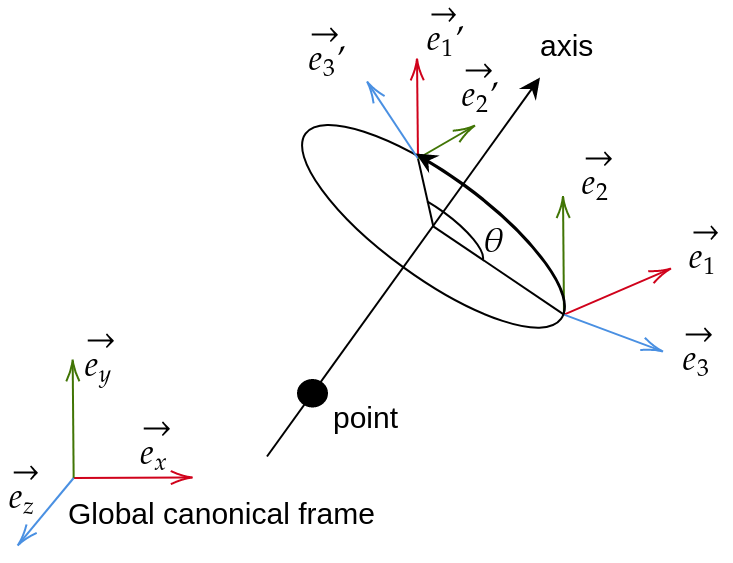
See also
py3dframe.Frame: for more information about the Frame class.py3dframe.translate(): to translate a frame by given offsets along each axis.py3dframe.translate_along_axis(): to translate a frame along a specific axis.
- Parameters:
frame (Frame) – The frame to rotate.
axis (numpy.ndarray) – A 3D vector representing the axis around which to rotate the frame. The vector not need to be normalized.
angle (float) – The angle in radians to rotate around the specified axis.
point (Optional[numpy.ndarray], optional) – A 3D point representing a point through which the rotation axis passes. If None, the rotation is performed around the frame’s origin. Default is None.
use_global (bool, optional) – If True, the rotation is applied in the global coordinate system. If False, the rotation is applied in the local coordinate system of the frame. Default is False.
inplace (bool, optional) – If True, the rotation is applied to the input frame and the same frame is returned. If False, a new rotated frame is returned and the input frame remains unchanged. Default is True.
- Returns:
The rotated frame.
- Return type:
Examples
from py3dframe import Frame
from py3dframe import rotate_around_axis
import numpy as np

# Create a default frame
frame = Frame.canonical()

# Define an axis to rotate around (e.g., the z-axis)
axis = np.array([0.0, 0.0, 1.0])
angle_rad = np.pi / 2  # 90 degrees in radians

# Rotate the frame by 90 degrees around the specified axis in the local coordinate system
rotated_frame = rotate_around_axis(frame, axis, angle_rad, use_global=False, inplace=True)

# The orientation of the rotated frame is now changed
print(rotated_frame.orientation)