py3dframe.Frame#
Frame class#
- class Frame(translation=None, rotation=None, *, parent=None, setup_only=False, convention=0)[source]#
A Frame object represents a frame of reference of \(\mathbb{R}^3\).
Warning
Only right-handed orthogonal frames are supported (orthonormal basis vectors with a positive determinant).
A frame of reference is defined by
An origin \(O_F\) as a 3-element vector.
Three basis vectors \(\mathbf{e}_1\), \(\mathbf{e}_2\) and \(\mathbf{e}_3\) as 3-element vectors.
For example:
import numpy
from py3dframe import Frame
e1 = [1, 0, 0]
e2 = [0, 1, 0]
e3 = [0, 0, 1]
origin = [1, 2, 3]
frame = Frame.from_axes(origin=origin, x_axis=e1, y_axis=e2, z_axis=e3)
The frame can also be defined by its transformation relative to its parent frame (by default the global canonical frame of \(\mathbb{R}^3\)). Lets note \(E\) the parent frame (or the global frame of \(\mathbb{R}^3\)) and \(F\) the frame to define. The transformation between the frame \(E\) and the frame \(F\) is defined by a rotation matrix \(R\) and a translation vector \(T\). Several conventions can be used to define the transformation between the frames.
Index
Formula
0
\(\mathbf{X}_E = \mathbf{R} \mathbf{X}_F + \mathbf{T}\)
1
\(\mathbf{X}_E = \mathbf{R} \mathbf{X}_F - \mathbf{T}\)
2
\(\mathbf{X}_E = \mathbf{R} (\mathbf{X}_F + \mathbf{T})\)
3
\(\mathbf{X}_E = \mathbf{R} (\mathbf{X}_F - \mathbf{T})\)
4
\(\mathbf{X}_F = \mathbf{R} \mathbf{X}_E + \mathbf{T}\)
5
\(\mathbf{X}_F = \mathbf{R} \mathbf{X}_E - \mathbf{T}\)
6
\(\mathbf{X}_F = \mathbf{R} (\mathbf{X}_E + \mathbf{T})\)
7
\(\mathbf{X}_F = \mathbf{R} (\mathbf{X}_E - \mathbf{T})\)
Note
If the axes are provided, the class will normalize the basis vectors to get an orthonormal matrix.
See also
class
py3dframe.FrameTransformto represent a transformation between two frames of reference and convert points between the frames.
- Parameters:
translation (array_like, optional) – The translation vector between the parent frame and the frame to create in the selected convention. The translation vector is a 3-element vector and the default value is the zero vector.
rotation (Rotation, optional) – The rotation between the parent frame and the frame to create in the selected convention. The rotation is a scipy.spatial.transform.Rotation object and the default value is the identity rotation.
parent (Optional[Frame], optional) – If given, the frame will be defined relatively to this parent frame. Default is None - the global frame of \(\mathbb{R}^3\).
setup_only (bool, optional) – If True, the parent frame will be used only to define the frame. Once the frame is created, its global position and orientation will be computed and the parent frame will be unlinked (set to None).
convention (int, optional) – Integer in
[0, 7]selecting the convention to express the transformation. Default is 0.
- Raises:
TypeError – If any of the parameters is wrong type.
Define the frame relatively to a parent frame#
A frame of reference can be defined relatively to another frame of reference called the parent frame.
If no parent frame is provided, the frame is defined relative to the global frame (the canonical frame of reference of \(\mathbb{R}^3\)).
For example, a person in a train can be represented by a frame called person_frame defined relatively to the frame of the train called train_frame. When the train moves, the train_frame is updated. The person_frame remains the same relatively to the train_frame but its position and orientation in the global frame changes.
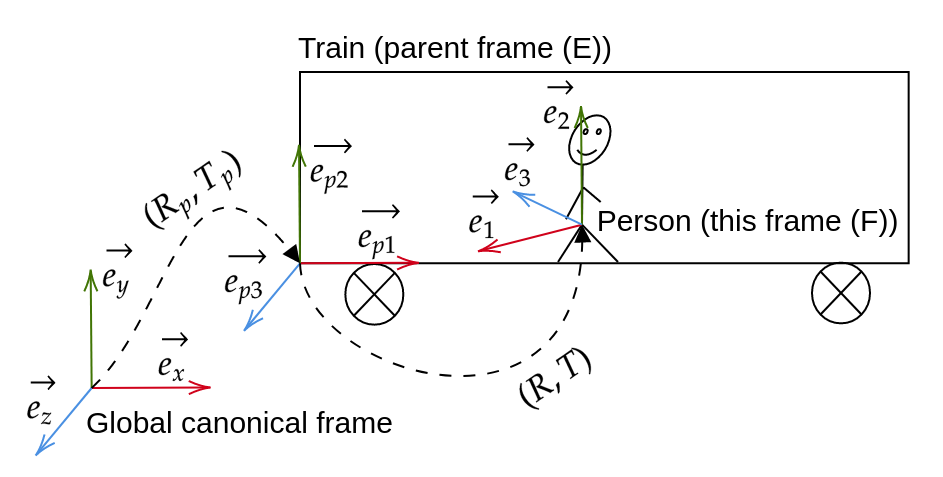
The transformation between the frame and its parent frame is defined by a rotation and a translation in a given convention. You can access the convention, the parent frame and extract the representation of the frame in the global frame coordinates system using the properties and methods below.
The convention to express the transformation between the parent frame and this frame. |
|
The parent frame of this frame (by default the canonical frame if None). |
|
Get the global frame of the frame. |
Create and manipulate Frames with axes and origin#
A Frame object can be manipulated by its axes and origin.
To define a frame using its axes and origin, you can use the following class method:
|
Create the canonical frame of reference of \(\mathbb{R}^3\). |
|
Create a Frame object from the given axes (origin and basis vectors). |
Once the frame is created, you can access and set the axes and origin of the current frame expressed in the parent frame coordinates system.
The origin of the frame relative to the parent frame. |
|
The basis vectors of the frame relative to the parent frame. |
|
The x-axis of the frame relative to the parent frame. |
|
The y-axis of the frame relative to the parent frame. |
|
The z-axis of the frame relative to the parent frame. |
To extract the axes and origin of the current frame expressed in the global frame coordinates system, you can use the properties and methods below. If the current frame has no parent, the global quantities are equal to the local quantities defined above.
The origin of the frame relative to the global frame. |
|
The basis vectors of the frame relative to the global frame. |
|
The x-axis of the frame relative to the global frame. |
|
The y-axis of the frame relative to the global frame. |
|
The z-axis of the frame relative to the global frame. |
Create and manipulate Frames with rotation and translation#
General transformation conventions#
A Frame object can be manipulated by its rotation and translation expressed in a given convention. The construction of the rotation and translation depends on the convention used.
Lets note \(E\) the parent frame (or the global frame) and \(F\) the frame to define. The transformation between the frame \(E\) and the frame \(F\) is defined by a rotation matrix \(R\) and a translation vector \(T\). Several conventions can be used to define the transformation between the frames.
Index |
Formula |
|---|---|
0 |
\(\mathbf{X}_E = \mathbf{R} \mathbf{X}_F + \mathbf{T}\) |
1 |
\(\mathbf{X}_E = \mathbf{R} \mathbf{X}_F - \mathbf{T}\) |
2 |
\(\mathbf{X}_E = \mathbf{R} (\mathbf{X}_F + \mathbf{T})\) |
3 |
\(\mathbf{X}_E = \mathbf{R} (\mathbf{X}_F - \mathbf{T})\) |
4 |
\(\mathbf{X}_F = \mathbf{R} \mathbf{X}_E + \mathbf{T}\) |
5 |
\(\mathbf{X}_F = \mathbf{R} \mathbf{X}_E - \mathbf{T}\) |
6 |
\(\mathbf{X}_F = \mathbf{R} (\mathbf{X}_E + \mathbf{T})\) |
7 |
\(\mathbf{X}_F = \mathbf{R} (\mathbf{X}_E - \mathbf{T})\) |
The default convention is 0.
To define a frame using its rotation and translation, you can use the following class methods:
|
Create a Frame object from a rotation ( |
Once the frame is created, you can access and set the rotation and translation of the current frame expressed in the parent frame coordinates system.
The translation vector between the parent frame and this frame in the convention of the frame. |
|
|
Access the translation vector between the parent frame and this frame in a specific convention. |
|
Set the translation vector between the parent frame and this frame in a specific convention. |
The rotation between the parent frame and this frame in the convention of the frame. |
|
|
Access the rotation between the parent frame and this frame in a specific convention. |
|
Set the rotation between the parent frame and this frame in a specific convention. |
To extract the rotation and translation of the current frame expressed in the global frame coordinates system, you can use the properties and methods below. If the current frame has no parent, the global quantities are equal to the local quantities defined above.
The translation vector between the global frame and this frame in the convention of the frame. |
|
|
Access the translation vector between the global frame and this frame in the given convention. |
|
Set the translation vector between the global frame and this frame in the given convention. |
The rotation between the global frame and this frame in the convention of the frame. |
|
|
Access the rotation between the global frame and this frame in the given convention. |
|
Set the rotation between the global frame and this frame in the given convention. |
Rotation matrix#
If you want to define the rotation using a rotation matrix instead of a scipy Rotation object, you can use the following class method:
|
Create a Frame object from a rotation matrix and translation. |
The quantities related to the rotation matrix can be accessed and set using the methods and properties below.
The rotation matrix between the parent frame and this frame in the convention of the frame. |
|
|
Access the rotation matrix between the parent frame and this frame in a specific convention. |
|
Set the rotation matrix between the parent frame and this frame in a specific convention. |
The rotation matrix representation of the rotation between the global frame and this frame in the convention of the frame. |
|
|
Access the rotation matrix representation of the rotation between the global frame and this frame in the given convention. |
|
Set the rotation matrix representation of the rotation between the global frame and this frame in the given convention. |
Quaternion#
If you want to define the rotation using a quaternion instead of a scipy Rotation object, you can use the following class method:
|
Create a Frame object from a quaternion and translation. |
The quantities related to the quaternion can be accessed and set using the methods and properties below.
The quaternion representation of the rotation between the parent frame and this frame in the convention of the frame. |
|
|
Access the quaternion representation of the rotation between the parent frame and this frame in a specific convention. |
|
Set the quaternion representation of the rotation between the parent frame and this frame in a specific convention. |
The quaternion representation of the rotation between the global frame and this frame in the convention of the frame. |
|
|
Access the quaternion representation of the rotation between the global frame and this frame in the given convention. |
|
Set the quaternion representation of the rotation between the global frame and this frame in the given convention. |
Euler angles#
If you want to define the rotation using Euler angles instead of a scipy Rotation object, you can use the following class method:
|
Create a Frame object from euler angles and translation. |
The quantities related to the Euler angles can be accessed and set using the methods and properties below.
The Euler angles representation of the rotation between the parent frame and this frame in the convention of the frame. |
|
|
Access the Euler angles representation of the rotation between the parent frame and this frame in a specific convention. |
|
Set the Euler angles representation of the rotation between the parent frame and this frame in a specific convention. |
The Euler angles representation of the rotation between the global frame and this frame in the convention of the frame. |
|
|
Access the Euler angles representation of the rotation between the global frame and this frame in the given convention. |
|
Set the Euler angles representation of the rotation between the global frame and this frame in the given convention. |
Rotation vector#
If you want to define the rotation using a rotation vector instead of a scipy Rotation object, you can use the following class method:
|
Create a Frame object from a rotation vector and translation. |
The quantities related to the rotation vector can be accessed and set using the methods and properties below.
The rotation vector representation of the rotation between the parent frame and this frame in the convention of the frame. |
|
|
Access the rotation vector representation of the rotation between the parent frame and this frame in a specific convention. |
|
Set the rotation vector representation of the rotation between the parent frame and this frame in a specific convention. |
The rotation vector representation of the rotation between the global frame and this frame in the convention of the frame. |
|
|
Access the rotation vector representation of the rotation between the global frame and this frame in the given convention. |
|
Set the rotation vector representation of the rotation between the global frame and this frame in the given convention. |
Save, load and other manipulation of Frames#
A Frame object can be saved and loaded using the methods below.
|
Save the Frame object to a dictionary. |
|
Load the Frame object from a dictionary. |
|
Save the Frame object to a JSON file. |
|
Load the Frame object from a JSON file. |
A Frame object can be copied using the method below.
Return a copy of the Frame object. |
|
Return a deep copy of the Frame object. |
Two frames can be compared using == and != operators. The comparison is done by comparing the origin and the basis vectors of the frames in the global frame coordinates system.
Examples of Frame creation and manipulation#
Lets \(E = (O_E, \mathbf{e}_1, \mathbf{e}_2, \mathbf{e}_3)\) be a frame of reference of \(\mathbb{R}^3\). To create the frame \(E\), the user can provide the origin and the basis vectors of the frame.
from py3dframe import Frame

origin = [1, 2, 3]
x_axis = [1, 1, 0]
y_axis = [1, -1, 0]
z_axis = [0, 0, 1]
frame_E = Frame.from_axes(origin=origin, x_axis=x_axis, y_axis=y_axis, z_axis=z_axis, parent=None)
A frame can also be defined relatively to another frame.
Lets consider a frame \(F = (O_F, \mathbf{f}_1, \mathbf{f}_2, \mathbf{f}_3)\) defined in the frame \(E\). The user must provide the origin and the basis vectors of the frame \(F\) in the frame \(E\).
from py3dframe import Frame

origin = [1, -2, 3]
x_axis = [1, 0, 1]
y_axis = [0, 1, 0]
z_axis = [-1, 0, 1]
frame_F = Frame.from_axes(origin=origin, x_axis=x_axis, y_axis=y_axis, z_axis=z_axis, parent=frame_E)
In this case the frame \(F\) is defined relatively to the frame \(E\). A change in the frame \(E\) will affect the frame \(F\) but the transformation between the frames will remain the same.
The user can access the origin and the basis vectors of the frame as follows:
# In the global frame (canonical frame of R3)
# -> changed by a move of the parent frame
frame_F.global_origin
frame_F.global_x_axis
frame_F.global_y_axis
frame_F.global_z_axis

# In the parent frame coordinates and relative to the parent frame
# -> unchanged by a move of the parent frame
frame_F.origin
frame_F.x_axis
frame_F.y_axis
frame_F.z_axis
To finish, the user can define a frame using the transformation between the parent frame and the frame. Using the convention 0, the rotation matrix and the translation vector will exactly be the basis vectors and the origin of the frame.
from py3dframe import Frame

translation = [1, 2, 3]
rotation_matrix = np.array([[1, 1, 0], [1, -1, 0], [0, 0, 1]]).T # Equivalent to the column_stack((x_axis, y_axis, z_axis))
rotation_matrix = rotation_matrix / np.linalg.norm(rotation_matrix, axis=0) # Normalize the columns to get an orthonormal matrix
frame_E = Frame.from_rotation_matrix(translation=translation, rotation_matrix=rotation_matrix, parent=None, convention=0)