pysdic.Camera.visualize_projected_point_cloud#
- Camera.visualize_projected_point_cloud(point_cloud, points_color='black', points_size=5, points_opacity=1.0, image=None, clip_sensor=True, show_pixel_grid=False, title=None)[source]#
Visualize the projected 2D points of a
PointCloudon a 2D plot using matplotlib.See also
project_points()to project 3D points to 2D image points.visualize_projected_mesh()to visualize projected 3D meshes.pysdic.PointCloudfor the structure of the input.Package matplotlib for visualization.
- Parameters:
point_cloud (
PointCloud) – An instance ofPointCloudcontaining the 3D points in the world coordinate system to be projected and visualized.points_color (
str, optional) – The color of the projected points in the plot. Default is"black".points_size (
int, optional) – The size of the projected points in the plot. Default is5.points_opacity (
float, optional) – The opacity of the projected points in the plot. Default is1.0(fully opaque).image (Optional[Union[
numpy.ndarray,Image]], optional) – An optional background image to display behind the projected points. If provided, the image should have dimensions matching the camera sensor size. Default is None.clip_sensor (
bool, optional) – IfTrue, only the points that are projected within the camera sensor dimensions are visualized. Default isTrue.show_pixel_grid (
bool, optional) – IfTrue, a grid representing the pixel layout of the camera sensor is displayed in the background. Default isFalse.title (Optional[
str], optional) – An optional title for the plot. Default is None with eefault title ‘Projected Points on Image Plane’.
- Return type:
None
Examples
Visualize a projected point cloud using a simple camera:
import numpy
from pysdic import Camera
from pycvcam import Cv2Extrinsic, Cv2Intrinsic
from pysdic import PointCloud

rotation_vector = numpy.array([0.1, 0.2, 0.3])
translation_vector = numpy.array([12.0, 34.0, 56.0])

extrinsic = Cv2Extrinsic.from_rt(rotation_vector, translation_vector)

intrinsic = Cv2Intrinsic.from_matrix(
    numpy.array([[1000, 0, 320],
                [0, 1000, 240],
                [0, 0, 1]])
)

camera = Camera(
    sensor_height=480,
    sensor_width=640,
    intrinsic=intrinsic,
    extrinsic=extrinsic,
)

# Define some 3D world points in a PointCloud instance
world_points_array = numpy.array([
    [0, 0, 1000],
    [100, 0, 1000],
    [0, 100, 1000],
    [100, 100, 1000]
])
world_points = PointCloud(points=world_points_array)

# Visualize the projected point cloud
camera.visualize_projected_point_cloud(point_cloud=world_points, points_color="red", points_size=10, show_pixel_grid=True)
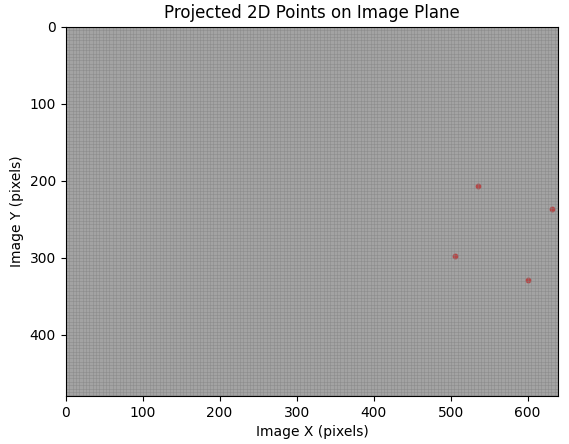
Example of projected point cloud visualization. This figure shows the 2D projection of the 3D points onto the image plane.#