pysdic.fem.bfs_neighborhood#
- bfs_neighborhood(graph, start, *, max_distance=1, self_neighborhood=True)[source]#
Compute the neighborhood of a starting node in an adjacency graph, i.e. the nodes within a given distance from the starting node.
Note
The search is performed with
scipy.sparse.csgraph.dijkstraon the unweighted graph, which is equivalent to a breadth-first search (BFS).Warning
No tests are performed to check if the input graph is valid (e.g., if the graph is not symmetric, …). The behavior of the function is undefined if the input graph is not valid.
- Parameters:
graph (Union[ArrayLike, scipy.sparse.spmatrix]) – The adjacency graph as a square matrix of shape \((N, N)\) (sparse or dense), where a non-zero entry at \((i, j)\) means that nodes \(i\) and \(j\) are neighbors.
start (Integral) – The index of the starting node.
max_distance (Integral, optional (default:
1)) – The maximum distance fromstartof the nodes in the neighborhood.self_neighborhood (bool, optional (default:
True)) – If True, the neighborhood includes the starting node itself.
- Returns:
neighborhood – A sorted integer array containing the indices of the nodes in the neighborhood.
- Return type:
See also
pysdic.fem.bfs_distanceDistances from a single node to all the nodes of a graph.
pysdic.fem.compute_neighborhoodNeighborhoods of all the nodes of a graph.
Examples
Create a simple disconnected graph of 7 nodes and compute the neighborhood of node 0 within a distance of 2.
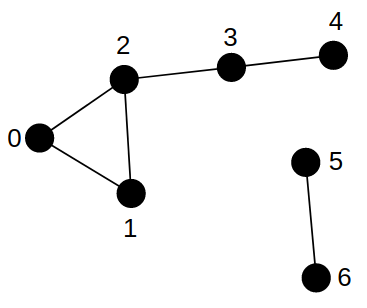
Disconnected graph with 7 nodes for BFS example. Nodes 0, 1, 2 and 3 are the only nodes in the neighborhood of node 0 for max_distance = 2.#
 1import numpy
 2from pysdic.fem import bfs_neighborhood
 3
 4edges = numpy.array([[0, 1], [0, 2], [1, 2], [2, 3], [3, 4], [5, 6]])
 5graph = numpy.zeros((7, 7), dtype=bool)
 6graph[edges[:, 0], edges[:, 1]] = True
 7graph[edges[:, 1], edges[:, 0]] = True
 8
 9neighborhood = bfs_neighborhood(graph, start=0, max_distance=2)
10print(neighborhood)
[0 1 2 3]