pygraphs.dfs_is_reachable#
- dfs_is_reachable(graph, start, end, *, _skip_check=False)[source]#
Check if a vertex is reachable from a starting vertex.
- Parameters:
- Returns:
If the ending vertex is reachable from starting vertex.
- Return type:
See also
pygraphs.dfs()Core implementation of DFS.
pygraphs.dfs_reachable()Perform a depth-first search (DFS) to extract the vertices that are reachable from a starting vertex in the graph.
Examples
Create a simple disconnected graph of 7 vertices and compute the shortest path distances from a starting vertex (0) to all other vertices in the graph.
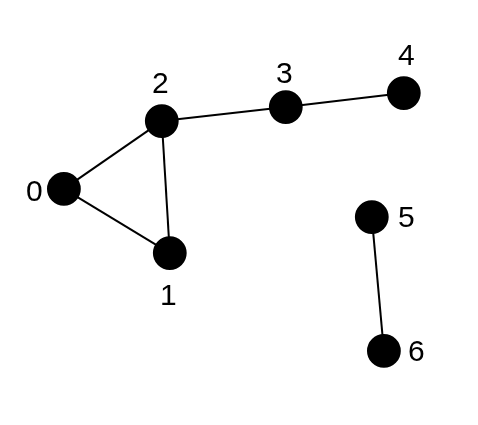
Disconnected graph with 7 vertices for DFS example. Vertex 4 is reachable from vertex 0.#
1from pygraphs import dfs_is_reachable, Graph
2
3graph = [[1, 2], [0, 2], [0, 1, 3], [2, 4], [3], [6], [5]]
4graph = Graph.from_adjacency(graph)
5start_vertex = 0
6end_vertex = 4
7
8is_reach = dfs_is_reachable(graph, start_vertex, end_vertex)
9print(is_reach)
TrueThis method can be applied for directed graphs as well, where the adjacency list represents the outgoing neighbors of each vertex.
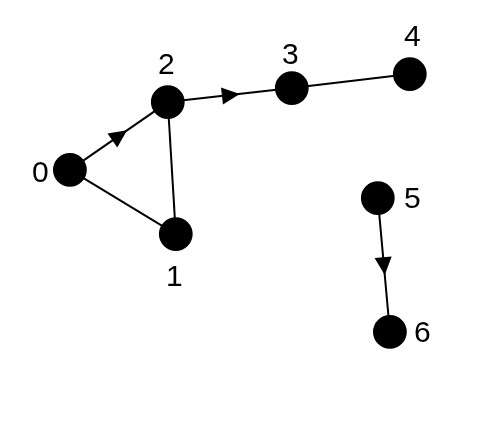
Directed graph with 7 vertices for DFS example. Vertex 5 is not reachable from vertex 6.#
1from pygraphs import dfs_is_reachable, Graph
2
3graph = [[1, 2], [0, 2], [1, 3], [4], [3], [6], []]
4graph = Graph.from_adjacency(graph)
5start_vertex = 6
6end_vertex = 5
7
8is_reach = dfs_is_reachable(graph, start_vertex, end_vertex)
9print(is_reach)
False