pygraphs.dfs#
- dfs(graph, start, *, stop_encounter=None, _skip_check=False)[source]#
[core function] Perform a depth-first search (DFS) traversal of a unweighted graph starting from a given vertex.
The function returns the list of vertices visited in DFS order.
Warning
No tests are performed to check if the input graph is valid (e.g., if the graph contains self-loops, if the graph contains invalid vertex indices, …). The behavior of the function is undefined if the input graph is not valid.
- Parameters:
graph (Graph) – An instance of the Graph class representing the graph to be traversed.
start (Integral) – The starting vertex index for the DFS.
stop_encounter (Optional[Integral], optional (default:
None)) – If provided, the BFS will stop as soon as this vertex is encountered. The provided vertex is included in the output._skip_check (bool)
- Returns:
order – List of vertices in the order they were visited by DFS.
- Return type:
List[int]
Notes
This is an iterative DFS implementation using an explicit stack.
Time complexity: O(V + E)
No guarantees are made about neighbor exploration order.
Examples
Create a simple disconnected graph of 7 vertices and compute the component from a starting vertex (0).
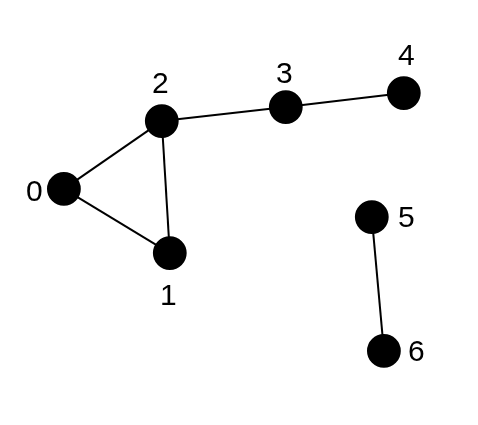
Disconnected graph with 7 vertices for DFS example. Component from vertex 0 is (0, 1, 2, 3, 4)#
1from pygraphs import dfs, Graph
2
3graph = [[1, 2], [0, 2], [0, 1, 3], [2, 4], [3], [6], [5]]
4graph = Graph.from_adjacency(graph)
5start_vertex = 0
6
7ord = dfs(graph, start_vertex)
8print("Visited Order:", comp)
Component: [0, 1, 2, 3, 4]This method can be applied for directed graphs as well, where the adjacency list represents the outgoing neighbors of each vertex.
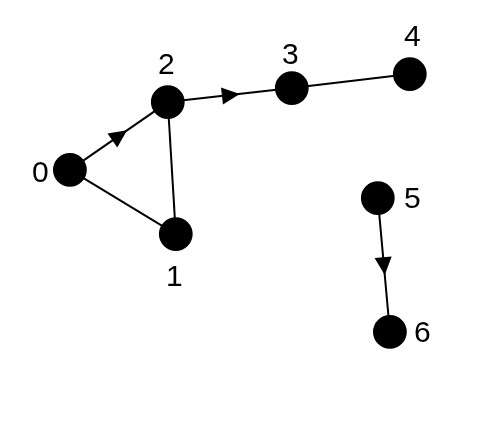
Directed graph with 7 vertices for DFS example. Componant of vertex 6 is only 6.#
1from pygraphs import dfs, Graph
2
3graph = [[1, 2], [0, 2], [1, 3], [4], [3], [6], []]
4graph = Graph.from_adjacency(graph)
5start_vertex = 6
6
7ord = dfs(graph, start_vertex)
8print("Visited Order:", ord)
Component: [6]