Note
Go to the end to download the full example code.
Lighting a specimen with Blender#
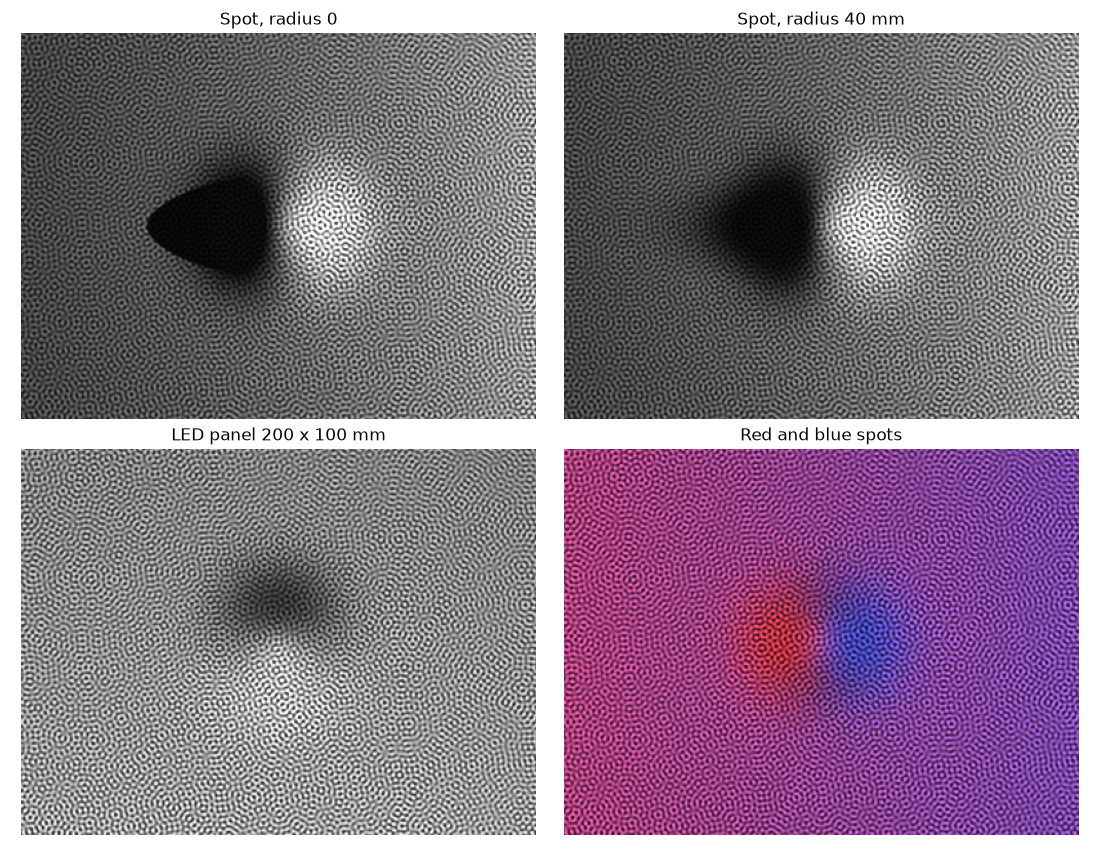
The lighting changes the gray levels of a speckled surface: shading, shadows, highlights. This
example renders a plate with a dome under several lights of pysdic_blender: a point-like
spot, a spot of finite size, an LED panel (area light), and two colored spots.
Important
Requires pysdic-blender (pip install pysdic-blender), which installs bpy.
The scene#
A speckled plate (in mm) with a dome of 8 mm in its center, added as a displacement of the vertices of a flat mesh, seen from 500 mm above.
import numpy
from pysdic import Camera, PerspectiveExtrinsic, PinholeIntrinsic, compute_wave_speckle, create_3d_triangle_3_heightmap
from pysdic_blender import BlenderCamera, BlenderMesh

camera = Camera(
    300, 400,
    extrinsic=PerspectiveExtrinsic.from_rt(rvec=[numpy.pi, 0.0, 0.0], tvec=[0.0, 0.0, 500.0]),
    intrinsic=PinholeIntrinsic.from_matrix([[2600.0, 0.0, 199.5], [0.0, 2600.0, 149.5], [0.0, 0.0, 1.0]]),
)
plate = create_3d_triangle_3_heightmap(x_bounds=(-45.0, 45.0), y_bounds=(-35.0, 35.0), n_x=181, n_y=141)
coordinates = numpy.asarray(plate.coordinates)
dome = numpy.zeros_like(coordinates)
dome[:, 2] = 8.0 * numpy.exp(-(coordinates[:, 0] ** 2 + coordinates[:, 1] ** 2) / (2 * 6.0 ** 2))

x, y = numpy.linspace(-45.0, 45.0, 900), numpy.linspace(35.0, -35.0, 700)  # First row: v = 1
speckle = compute_wave_speckle(numpy.stack(numpy.meshgrid(x, y), axis=-1), wavelength=0.8)

blender_camera = BlenderCamera(camera)
blender_plate = BlenderMesh(plate, displacement=dome, texture=speckle, smooth=True)
Lights#
a spot at a grazing angle (25°) with a radius 0: a point source, sharp shadow of the dome;
the same spot with a radius of 40 mm (a real projector): soft shadow;
a rectangular LED panel of 200 x 100 mm (
pysdic_blender.BlenderAreaLight): a broad, almost uniform lighting;a red spot on the left and a blue spot on the right, rendered in color (
color=True).
The energies only set the brightness: each render is normalized for the display.
from pysdic_blender import BlenderAreaLight, BlenderSpotLight

grazing = [230.0 * numpy.cos(numpy.radians(25.0)), 0.0, 230.0 * numpy.sin(numpy.radians(25.0))]
setups = {
    "Spot, radius 0": [BlenderSpotLight.looking_at(grazing, [0.0, 0.0, 0.0], energy=1e6, spot_size=numpy.pi / 3)],
    "Spot, radius 40 mm": [
        BlenderSpotLight.looking_at(grazing, [0.0, 0.0, 0.0], energy=1e6, spot_size=numpy.pi / 3, radius=40.0)
    ],
    "LED panel 200 x 100 mm": [
        BlenderAreaLight.looking_at(
            [0.0, -250.0, 350.0], [0.0, 0.0, 0.0], size=200.0, size_y=100.0, shape="RECTANGLE",
            up=[1.0, 0.0, 0.0], energy=1e6,
        )
    ],
    "Red and blue spots": [
        BlenderSpotLight.looking_at([-200.0, 0.0, 250.0], [0.0, 0.0, 0.0], energy=1e6, color=(1.0, 0.15, 0.1), radius=10.0),
        BlenderSpotLight.looking_at([200.0, 0.0, 250.0], [0.0, 0.0, 0.0], energy=1e6, color=(0.1, 0.3, 1.0), radius=10.0),
    ],
}
Rendering#
The scene is built once; the lights are replaced between the renders. A weak ambient light lights the shadows.
import matplotlib.pyplot as plt
from pysdic_blender import BlenderExperiment, get_matte_paint_material

experiment = BlenderExperiment(background_strength=0.02)
experiment.add_camera("camera", blender_camera)
experiment.add_mesh("plate", blender_plate, material=get_matte_paint_material())

renders = {}
for name, lights in setups.items():
    for index, light in enumerate(lights):
        if isinstance(light, BlenderSpotLight):
            experiment.add_spotlight(f"light_{index}", light)
        else:
            experiment.add_arealight(f"light_{index}", light)
    renders[name] = experiment.render("camera", n_samples=128, color=(name == "Red and blue spots"))
    for index, light in enumerate(lights):
        if isinstance(light, BlenderSpotLight):
            experiment.remove_spotlight(f"light_{index}")
        else:
            experiment.remove_arealight(f"light_{index}")

fig, axes = plt.subplots(2, 2, figsize=(11, 8.5))
for ax, (name, render) in zip(axes.ravel(), renders.items()):
    image = numpy.clip(render / numpy.percentile(render, 99.5), 0.0, 1.0)
    ax.imshow(image, cmap="gray", vmin=0.0, vmax=1.0)
    ax.set_title(name)
    ax.axis("off")
fig.tight_layout()
plt.show()
Monochrome sensor#
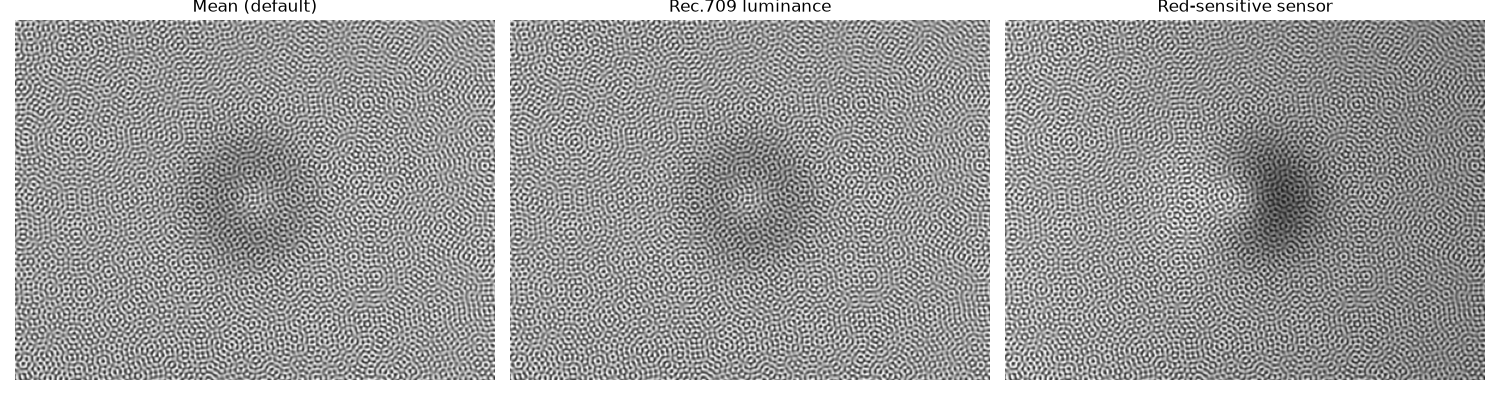
By default, pysdic_blender.BlenderExperiment.render() returns the intensity of a
monochrome sensor, a weighted sum of the RGB channels (channel_weights, the mean by
default). The weights are the spectral sensitivity of the sensor: under colored lights, they
change the contrast between the two sides of the dome.
rgb = renders["Red and blue spots"]
sensors = {
    "Mean (default)": (1 / 3, 1 / 3, 1 / 3),
    "Rec.709 luminance": (0.2126, 0.7152, 0.0722),
    "Red-sensitive sensor": (0.7, 0.25, 0.05),
}
fig, axes = plt.subplots(1, len(sensors), figsize=(15, 4))
for ax, (name, weights) in zip(axes, sensors.items()):
    intensity = rgb @ numpy.asarray(weights)  # The same as render(..., channel_weights=weights)
    ax.imshow(intensity / numpy.percentile(intensity, 99.5), cmap="gray", vmin=0.0, vmax=1.0)
    ax.set_title(name)
    ax.axis("off")
fig.tight_layout()
plt.show()
Total running time of the script: (0 minutes 26.884 seconds)