Note
Go to the end to download the full example code.
Placing the cameras with frames#
A rotation vector and a translation (rvec, tvec) describe the world-to-camera
transformation: exact, but hard to write by hand. It is often simpler to give the frame of the
camera in the world: its optical center and its axes (OpenCV: \(x\) to the right of the
image, \(y\) downwards, \(z\) along the optical axis). This example builds the
extrinsics of a stereo rig with py3dframe.Frame and
pysdic.PerspectiveExtrinsic.from_frame(), then renders it with Blender.
Important
Requires pysdic-blender (pip install pysdic-blender), which installs bpy, and
py3dframe.
A frame written by hand#
A camera 500 mm above the origin, looking downwards: the optical axis \(z\) is \(-Z\) of the world, the rows of the image (\(y\)) go along \(-Y\) so that \(+Y\) is at the top of the image. The axes must be orthonormal and direct (\(\vec{x} \times \vec{y} = \vec{z}\)).
import numpy
from py3dframe import Frame
from pysdic import Camera, PerspectiveExtrinsic, PinholeIntrinsic

intrinsic = PinholeIntrinsic.from_matrix([[2200.0, 0.0, 239.5], [0.0, 2200.0, 179.5], [0.0, 0.0, 1.0]])

top_frame = Frame.from_axes(origin=[0.0, 0.0, 500.0], x_axis=[1.0, 0.0, 0.0], y_axis=[0.0, -1.0, 0.0], z_axis=[0.0, 0.0, -1.0])
top_camera = Camera(360, 480, extrinsic=PerspectiveExtrinsic.from_frame(top_frame), intrinsic=intrinsic)
Frames looking at a target#
For a camera at a position looking at a target, the axes follow from two directions: the
optical axis \(\vec{z}\) towards the target, and a direction up of the world that
must appear upwards in the image (so \(\vec{y}\) is the opposite of up, made
orthogonal to \(\vec{z}\)). Then \(\vec{x} = \vec{y} \times \vec{z}\).
def looking_at_frame(position, target, up=(0.0, 1.0, 0.0)):
    position, target, up = (numpy.asarray(v, dtype=float) for v in (position, target, up))
    z_axis = (target - position) / numpy.linalg.norm(target - position)
    y_axis = -(up - (up @ z_axis) * z_axis)
    y_axis /= numpy.linalg.norm(y_axis)
    x_axis = numpy.cross(y_axis, z_axis)
    return Frame.from_axes(origin=position, x_axis=x_axis, y_axis=y_axis, z_axis=z_axis)


angle = numpy.radians(15.0)
positions = {
    "top": numpy.array([0.0, 0.0, 500.0]),
    "left": 500.0 * numpy.array([-numpy.sin(angle), 0.0, numpy.cos(angle)]),
    "right": 500.0 * numpy.array([numpy.sin(angle), 0.0, numpy.cos(angle)]),
}
frames = {name: looking_at_frame(positions[name], [0.0, 0.0, 0.0]) for name in ("left", "right")}
cameras = {"top": top_camera}
cameras.update({
    name: Camera(360, 480, extrinsic=PerspectiveExtrinsic.from_frame(frame), intrinsic=intrinsic)
    for name, frame in frames.items()
})
Check of the conventions#
The center of a pysdic_blender.BlenderCamera is the origin of the frame, and the
target (the origin of the world) is seen at the principal point \((c_x, c_y)\).
from pysdic_blender import BlenderCamera

blender_cameras = {name: BlenderCamera(camera) for name, camera in cameras.items()}
for name, blender_camera in blender_cameras.items():
    assert numpy.allclose(blender_camera.center, positions[name], atol=1e-9)
    target = numpy.asarray(cameras[name].intrinsic.apply(numpy.asarray(cameras[name].extrinsic.apply(numpy.zeros((1, 3))).x)).x)
    print(f"{name:6s} center {numpy.round(blender_camera.center, 3)}   origin of the world seen at {numpy.round(target[0], 3)}")
    assert numpy.allclose(target[0], [239.5, 179.5], atol=1e-6)
top    center [ -0.  -0. 500.]   origin of the world seen at [239.5 179.5]
left   center [-129.41    -0.     482.963]   origin of the world seen at [239.5 179.5]
right  center [129.41   -0.    482.963]   origin of the world seen at [239.5 179.5]
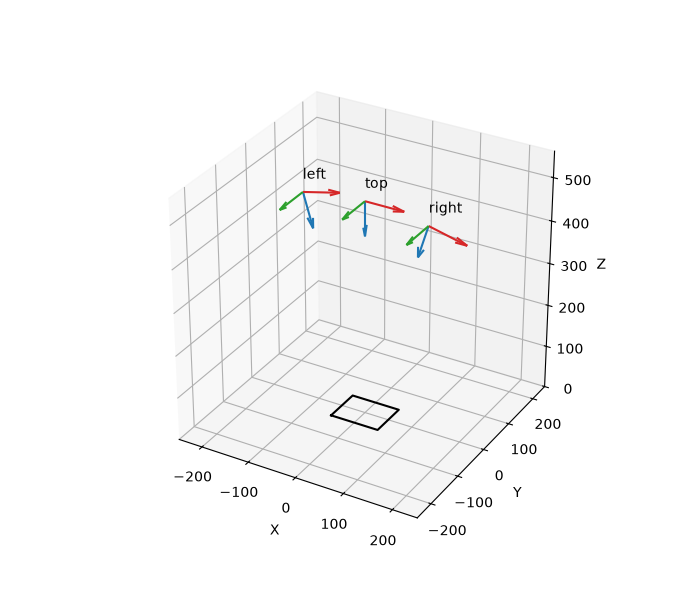
The rig#
The frames of the cameras (red: \(x\), green: \(y\), blue: optical axis \(z\)) above the plate.
import matplotlib.pyplot as plt

fig = plt.figure(figsize=(7, 6))
ax = fig.add_subplot(projection="3d")
corners = numpy.array([[-50, -40, 0], [50, -40, 0], [50, 40, 0], [-50, 40, 0], [-50, -40, 0]], dtype=float)
ax.plot(*corners.T, color="black")
for name, blender_camera in blender_cameras.items():
    center, rows = blender_camera.center, blender_camera.rotation  # Rows of R: axes of the camera in the world
    for axis, color in zip(rows, ("tab:red", "tab:green", "tab:blue")):
        ax.quiver(*center, *(80.0 * axis), color=color)
    ax.text(*(center + [0.0, 0.0, 30.0]), name)
ax.set_xlabel("X")
ax.set_ylabel("Y")
ax.set_zlabel("Z")
ax.set_box_aspect((1.0, 1.0, 1.0))
ax.set_xlim(-250, 250)
ax.set_ylim(-250, 250)
ax.set_zlim(0, 560)
plt.show()
Rendering#
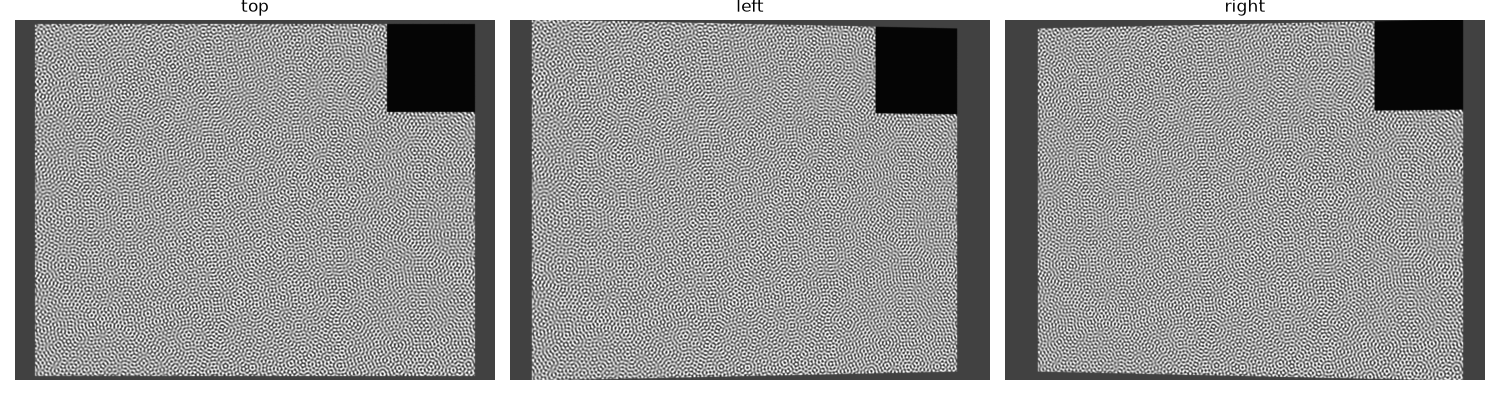
A speckled plate with a mark in its top-right corner (\(X > 0\), \(Y > 0\)), to see the orientation of each image, lit by an LED panel above the rig.
from pysdic import Image, compute_wave_speckle, create_3d_triangle_3_heightmap
from pysdic_blender import BlenderAreaLight, BlenderExperiment, BlenderMesh, get_matte_paint_material

plate = create_3d_triangle_3_heightmap(x_bounds=(-50.0, 50.0), y_bounds=(-40.0, 40.0), n_x=3, n_y=3)
x, y = numpy.linspace(-50.0, 50.0, 1000), numpy.linspace(40.0, -40.0, 800)  # First row: v = 1
X, Y = numpy.meshgrid(x, y)
speckle = compute_wave_speckle(numpy.stack((X, Y), axis=-1), wavelength=0.8)
speckle = numpy.array(speckle.image if isinstance(speckle, Image) else speckle, dtype=float).reshape(X.shape)
speckle[(X > 30.0) & (Y > 20.0)] = 0.0  # Black mark in the corner X > 0, Y > 0

experiment = BlenderExperiment(background_strength=0.05)
experiment.add_mesh("plate", BlenderMesh(plate, texture=speckle), material=get_matte_paint_material())
experiment.add_arealight("panel", BlenderAreaLight([0.0, 0.0, 700.0], [0.0, 0.0, -1.0], size=400.0, energy=1e6))
for name, blender_camera in blender_cameras.items():
    experiment.add_camera(name, blender_camera)

fig, axes = plt.subplots(1, len(blender_cameras), figsize=(5 * len(blender_cameras), 4))
for ax, name in zip(axes, blender_cameras):
    render = experiment.render(name, n_samples=128)
    ax.imshow(render / numpy.percentile(render, 99.5), cmap="gray", vmin=0.0, vmax=1.0)
    ax.set_title(name)
    ax.axis("off")
fig.tight_layout()
plt.show()
Total running time of the script: (0 minutes 24.107 seconds)