Note
Go to the end to download the full example code.
Depth-First Search (DFS) Example#
This example demonstrates the Depth-First Search (DFS) algorithm on a simple pygraphs.Graph.
The DFS algorithm explores the vertices of a graph in depth first, starting from a given source vertex
and visiting all a path before moving on to an other path of vertices.
Note
The order of indices in list outputs is not guaranteed. In particular, the order may depend on the internal representation of the graph and the traversal order (e.g., DFS or adjacency iteration order).
Define the graphs#
Create a simple disconnected graph of 7 vertices
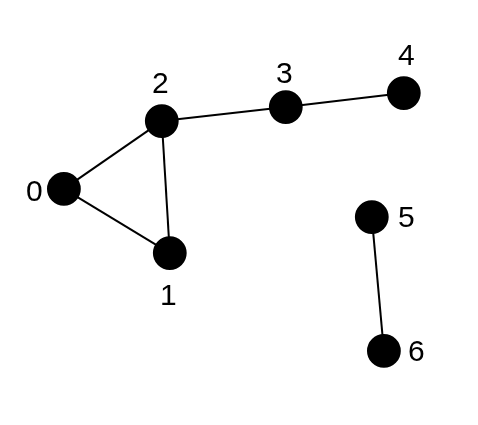
Disconnected graph with 7 vertices for BFS example. Distance from vertex 0 to vertex 4 is 3 (0 -> 2 -> 3 -> 4).#
And a directed graph of 7 vertices
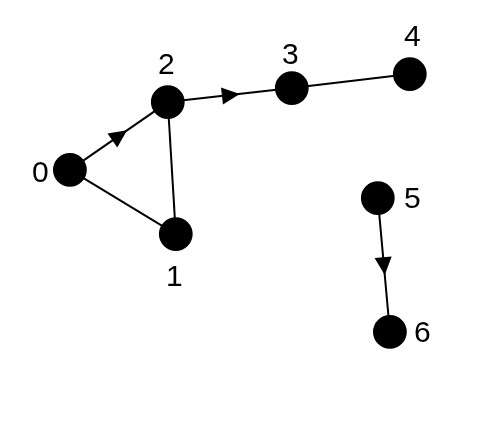
Directed graph with 7 vertices for BFS example. Distance from vertex 2 to vertex 0 is 2 (2 -> 1 -> 0).#
from pygraphs import Graph

graph = [[1, 2], [0, 2], [0, 1, 3], [2, 4], [3], [6], [5]]
undirected_graph = Graph.from_adjacency(graph)
print(undirected_graph.is_directed())  # False

graph = [[1, 2], [0, 2], [1, 3], [4], [3], [6], []]
directed_graph = Graph.from_adjacency(graph)
print(directed_graph.is_directed())  # True
False
True
DFS Examples#
DFS Reachability#
The reachability between two vertices can be checked using the pygraphs.dfs_is_reachable() method.
It returns True if there exists a path from the source vertex to the target vertex in the graph
following a depth-first search traversal, and False otherwise.
from pygraphs import dfs_is_reachable

start_vertex = 0
end_vertex = 4
is_reachable = dfs_is_reachable(undirected_graph, start_vertex, end_vertex)
print(is_reachable)  # True

start_vertex = 6
end_vertex = 5
is_reachable = dfs_is_reachable(directed_graph, start_vertex, end_vertex)
print(is_reachable)  # False
True
False
DFS Reachable Vertices#
The DFS reachable vertices from a source vertex can be computed using the pygraphs.dfs_reachable() method.
The reachable vertices are defined as the set of vertices that can be reached from the source vertex
using a depth-first search traversal.
from pygraphs import dfs_reachable

start_vertex = 0
reachable_vertices = dfs_reachable(undirected_graph, start_vertex)
print(reachable_vertices)  # [0, 1, 2, 3, 4]

start_vertex = 6
reachable_vertices = dfs_reachable(directed_graph, start_vertex)
print(reachable_vertices)  # [6]
[0, 2, 3, 4, 1]
[6]
DFS Connected Components#
The DFS connected components of a graph can be computed using the pygraphs.dfs_components() method.
A connected component is defined as a set of vertices that are reachable from each other
in at least one direction (i.e., there is a path from vertex A to vertex B OR from vertex B to vertex A).
Note
Use strongly_connected=True to compute the strongly connected components of a directed graph,
where both vertices A and B must be reachable from each other (i.e., there is a path from vertex A to vertex B AND
from vertex B to vertex A). In this case, the Kosaraju algorithm is used.
from pygraphs import dfs_components

components = dfs_components(undirected_graph)
print(components)  # [[0, 1, 2, 3, 4], [5, 6]]

components = dfs_components(directed_graph, strongly_connected=False)
print(components)  # [[0, 1, 2, 3, 4], [5, 6]]

components = dfs_components(directed_graph, strongly_connected=True)
print(components)  # [[0, 1, 2], [3, 4], [5], [6]]
[[0, 2, 3, 4, 1], [5, 6]]
[[0, 2, 3, 4, 1], [5, 6]]
[[4, 3], [2, 1, 0], [6], [5]]
Total running time of the script: (0 minutes 0.003 seconds)